What's new in Heart Tracker 2.2
Our biggest update yet, built to help you lower your LDL with food: a plan, a programme, faster logging and answers to "can I eat this?"
Update or download free
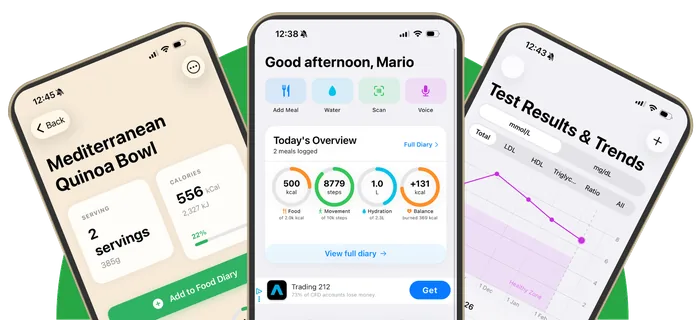
Heart Tracker 2.2 turns a cholesterol tracker into a plan for lowering LDL with food. It adds a Plan tab that turns your test result into a goal and weekly food focus, a 30-day LDL Reset built on the Portfolio diet, photo and voice meal logging, a "Can I eat this?" scanner for foods and restaurant menus, weekly and monthly progress reviews, a daily heart check-in, medication reminders, a doctor report PDF and Apple Intelligence on supported iPhones. It's free on iPhone and iPad.
The new features at a glance
NewPlan tab
Your test results, LDL goal and today's job in one place. Add a result and Heart Tracker explains it, helps you set a goal and gives you one food focus a week until your retest.
Your LDL plan →NewLDL Reset
30 guided days. One small task a day and one LDL-lowering food group a week, with daily menu ideas from 64 recipes, one-tap logging and a shopping list.
30-day LDL Reset →NewSnap or say your meal
Photograph your plate or describe it out loud, then check each match and portion before you save.
Photo logging →NewCan I eat this?
Scan a product for a heart score out of 10, traffic-light labels and a better swap. Also on a widget, the Lock Screen and Control Center.
Food scanner →NewEating out
Scan a restaurant menu to see which dishes suit your heart, with estimated calories, saturated fat and fibre and tips to order better.
Menu scanner →NewProgress reviews
Your eating, activity, weight and test results brought together each week and month, with one or two practical tips.
Progress reviews →NewDaily heart check-in
A 10-second check-in on the LDL-lowering food groups, filled in from your meals, building a weekly heart score.
Heart check-in →NewMedication and doctor report
Tick off your statin with an optional reminder, and share a doctor report of your results and eating habits as a PDF.
Medication tracker →NewApple Intelligence
Smarter photo and voice logging, menu and label scans and reviews on supported iPhones. It runs on your iPhone; Private Cloud Compute is only used if you allow it.
Private AI →Smaller things that make a big difference
- Label scan: photograph a nutrition label to create a food that isn't in the database.
- Log it roughly: when search can't find a food, log an estimate in seconds.
- Same as last time: log your usual breakfast, lunch or dinner straight from the meal reminder.
- A first-3-days goal: log on three days in your first week and earn a Streak Freeze.
- Weekly goal of 5 days out of 7, and a gentler "pick up where you left off" after a break. See streaks.
- Ask a question about cholesterol and get answers from our articles, with sources.
- Siri and Shortcuts for today's menu, your weekly heart score and your daily check-in.
- Larger text and VoiceOver support on every screen.
- Bug fixes and performance improvements.
Who Heart Tracker 2.2 is for
Anyone with high cholesterol, acting on a worrying blood test, taking a statin, following a heart-healthy or Portfolio diet, or eating to prevent heart disease. When you open the app, it asks what brought you there and shapes the plan around your answer.
How Heart Tracker compares
Most calorie counters can't log a cholesterol test, and most cholesterol apps don't track food. Heart Tracker does both, adds a plan for lowering LDL and stays free with no subscription and no account. See our guide to the best cholesterol tracking apps, or how it compares with Cronometer and MyFitnessPal.
Frequently asked questions
What's new in Heart Tracker 2.2?
A Plan tab, a 30-day LDL Reset, photo and voice meal logging, a Can I eat this? food and menu scanner, weekly and monthly progress reviews, a daily heart check-in and weekly heart score, medication reminders, a doctor report PDF, Apple Intelligence on supported iPhones, and larger text and VoiceOver support.
Is Heart Tracker 2.2 free?
Yes. Heart Tracker is free to download and use, with no subscription, no premium tier and no account.
How do I get Heart Tracker 2.2?
Download Heart Tracker from the App Store, or update it from the App Store's Updates list if you already have it. It needs iOS 26.0 or later.
Is Heart Tracker 2.2 on Android?
The 2.2 features are on iPhone and iPad first. An Android beta is open, and you can sign up for early access.
Do I lose my data when I update?
No. Your meals, results and settings stay on your iPhone when you update. If you've used Heart Tracker before, a short guide shows you what's new and asks what you'd like help with.
Related
Get Heart Tracker 2.2
A plan for lowering your LDL with food, in your pocket. Free on iPhone and iPad.
Download on theApp StoreFree download • iPhone and iPad • iOS 26.0 or later • No account needed